# 제품 옵션 활성화

{% hint style="danger" %}
버전 1.39부터 제품 옵션 기능을 더 이상 지원하지 않습니다. 단, 기존에 설치되어 제품 옵션 기능을 사용 중인 조직에서는 계속 사용할 수 있습니다.
{% endhint %}

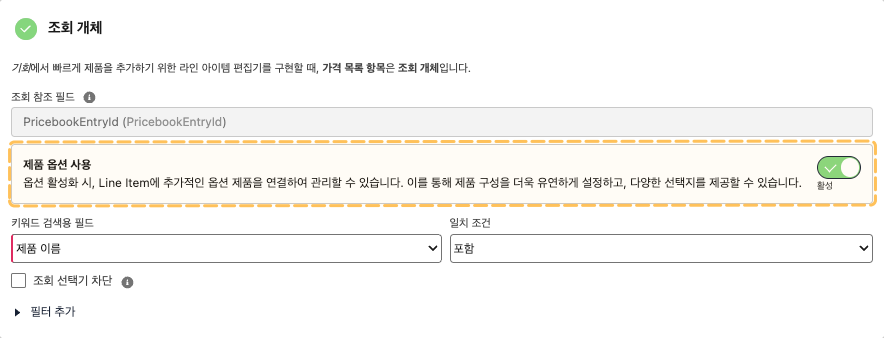
제품 옵션을 사용하려면 빌더에서 제품 옵션 기능을 활성화해야 합니다. 해당 설정은 개체 연결 단계의 조회 개체 영역에서 활성화할 수 있습니다.

단, 제품 옵션 설정은 **스탠다드 설정(기회, 견적, 주문)인 경우**에만 가능합니다.

<figure><img src="https://3985481653-files.gitbook.io/~/files/v0/b/gitbook-x-prod.appspot.com/o/spaces%2FA2fSsDo5KsIVkUoDIV1b%2Fuploads%2FWjXeyfjZlVBm3rO0H83e%2F%E1%84%8C%E1%85%A6%E1%84%91%E1%85%AE%E1%86%B7%E1%84%8B%E1%85%A9%E1%86%B8%E1%84%89%E1%85%A7%E1%86%AB%E1%84%92%E1%85%AA%E1%86%AF%E1%84%89%E1%85%A5%E1%86%BC%E1%84%92%E1%85%AA.png?alt=media&#x26;token=96a78bc7-e49d-40b6-9b7e-9fa1a6438809" alt=""><figcaption></figcaption></figure>

### 스탠다드 설정에서만 제품 옵션 제공

앞서 안내한 것처럼, 제품 옵션은 스탠다드 설정에서만 활성화할 수 있습니다.

제품 옵션은 **가격 목록 항목(**`PricebookEntry`**)을 기준으로 제품과 단가 정보를 조회**하기 때문에, 세일즈포스에서 가격 목록 항목과 유일하게 관계를 맺고 있는 **기회(**`Opportunity`**), 견적(**`Quote`**), 주문(**`Order`**)에 한정**하여 제공됩니다.
<table><thead><tr><th width="93">대상 개체</th><th width="153">부모 개체</th><th width="224">라인 아이템 개체</th><th width="280">조회 개체</th></tr></thead><tbody><tr><td><strong>기회</strong></td><td><p>기회</p><p><code>Opportunity</code></p></td><td><p>기회 제품</p><p><code>OpportunityLineItem</code></p></td><td><p>가격 목록 항목</p><p><code>PricebookEntry</code></p></td></tr><tr><td><strong>견적</strong></td><td><p>견적</p><p><code>Quote</code></p></td><td><p>견적서 행 아이템</p><p><code>QuoteLineItem</code></p></td><td><p>가격 목록 항목</p><p><code>PricebookEntry</code></p></td></tr><tr><td><strong>주문</strong></td><td><p>주문</p><p><code>Order</code></p></td><td><p>주문 제품</p><p><code>OrderItem</code></p></td><td><p>가격 목록 항목</p><p><code>PricebookEntry</code></p></td></tr></tbody></table>
