> For the complete documentation index, see [llms.txt](https://help.smallbuilder.com/llms.txt). Markdown versions of documentation pages are available by appending `.md` to page URLs; this page is available as [Markdown](https://help.smallbuilder.com/ko/smallbuilder-line-items/builder/builder-setup-steps/relate-objects/lookup-object/select-lookup-reference-field.md).
# 설정 방법
부모 개체에서 시작하여 하위 개체인 라인 아이템을 선택하고, 라인 아이템이 참조하고 있는 조회 개체를 설정합니다. 조회 개체를 지정할 때는, 라인 아이템에서 조회 개체를 참조하는 필드를 선택해야 합니다.
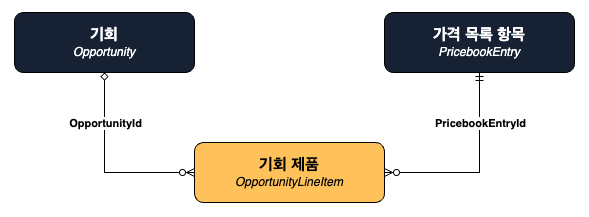
기회(`Opportunity`)에 대한 기회 제품(`OpportunityLineItem`)을 기반으로 빌더를 설정한다고 가정해 보겠습니다. 아래 개체 구조 이미지와 같이 기회 제품은 두 가지 주요 관계를 가집니다:
* **기회(**`Opportunity`**)**
기회 제품의 상위 개체로 **기회 ID(**`OpportunityId`**)** 필드로 참조됩니다.
* **가격 목록 항목(**`PricebookEntry`**)**
기회 제품이 참조하고 있는 개체로 **가격 목록 항목 ID(**`PricebookEntryId`**)** 필드로 참조됩니다.
**부모 개체**는 기회(`Opportunity`)로 선택합니다.
**라인 아이템 개체**는 기회 제품(`OpportunityLineItem`)으로 선택합니다.
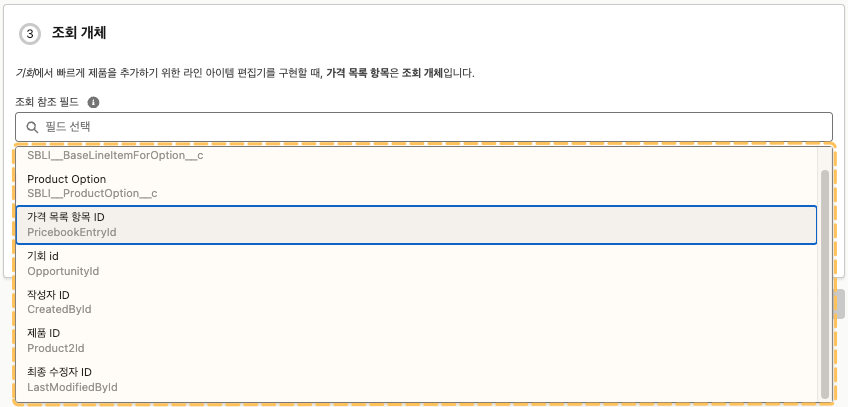
기회 제품(`OpportunityLineItem`)은 가격 목록 항목(`PricebookEntry`)을 참조하여 생성되기 때문에, 조회 참조 필드로 기회 제품의 가격 목록 항목 ID(`PricebookEntryId`) 필드를 선택해야 합니다.