> For the complete documentation index, see [llms.txt](https://help.smallbuilder.com/llms.txt). Markdown versions of documentation pages are available by appending `.md` to page URLs; this page is available as [Markdown](https://help.smallbuilder.com/ko/smallbuilder-line-items/builder/builder-setup-steps/relate-objects/lookup-object/keyword-setting.md).
# 키워드 검색 설정하기
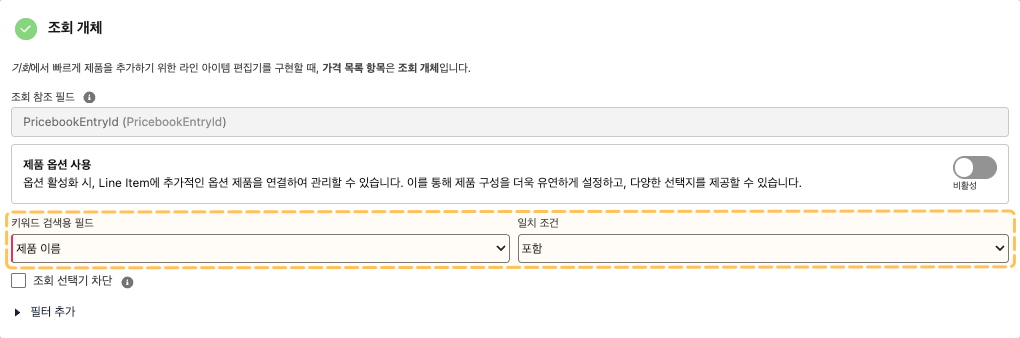
조회 레코드를 검색할 때 검색할 키워드의 대상 필드값을 설정합니다. 기본적으로 **이름 필드**가 검색 대상으로 지정되며, 일치 조건은 **포함(Contains)**입니다.
### 예시
키워드 검색 필드는 **가격 목록 항목(**`PricebookEntry`**)** 개체의 **제품 이름(**`Name`**)** 필드로 설정되어 있습니다. 검색 조건은 **포함(Contains)**이며, 입력한 검색 키워드가 제품 이름 필드 값에 포함된 경우 조회됩니다.
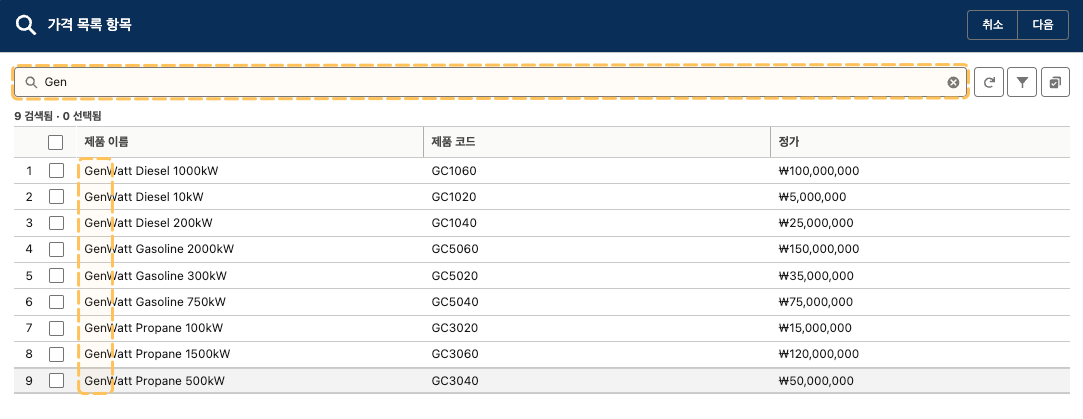
편집기에서 조회 선택기 화면에 ‘Gen’을 입력하면, 제품 이름에 ‘Gen’이 포함된 항목만 검색되는 것을 확인할 수 있습니다.