> For the complete documentation index, see [llms.txt](https://help.smallbuilder.com/llms.txt). Markdown versions of documentation pages are available by appending `.md` to page URLs; this page is available as [Markdown](https://help.smallbuilder.com/ko/smallbuilder-line-items/builder/builder-setup-steps/relate-objects/line-item-object/auto-number.md).
# 자동 번호 설정하기
라인 아이템 저장 시 자동 번호를 설정할 수 있습니다. 이 기능은 특히 제품 옵션을 사용하는 경우, 각 라인 아이템을 구분하고 관리하기에 유용합니다.
{% hint style="warning" %}
자동 번호는 라인 아이템 편집기 화면에서 저장하는 경우에만 해당되며, Salesforce 내부 트랜잭션(예: API, 데이터 로더, 또는 수동 삭제)에서는 자동으로 번호가 할당되지 않습니다.
{% endhint %}
### 예시: 제품 옵션과 함께 등록된 기회 제품에 자동 번호 할당하기
{% hint style="info" %}
이 예시에서는 기회 제품에 대한 라인 아이템 편집기를 설정하였습니다.
* **부모:** 기회(`Opportunity`)
* **라인 아이템:** 기회 제품(`OpportunityLineItem`)
* **조회:** 가격 목록 항목(`PricebookEntry`)
{% endhint %}
기회 상세 페이지에서 라인 아이템 편집기를 사용해 기회 제품을 저장하고, 기회에서 견적을 생성한 뒤, 수정된 내용을 다시 기회에 동기화(Sync)하는 과정을 진행한다고 가정해 보겠습니다.
그러나 순서 정렬(`SortOrder`) 필드값을 올바르게 저장하지 않으면, 제품 옵션에 대한 라인 아이템들이 잘못된 순서로 정렬되어 사용자에게 혼란을 줄 수 있습니다. 이를 해결하기 위해 순서 정렬(`SortOrder`) 필드에 자동 번호를 할당하여, 동기화(Sync) 시 순서가 올바르게 정렬되도록 설정합니다.
#### 빌더 설정
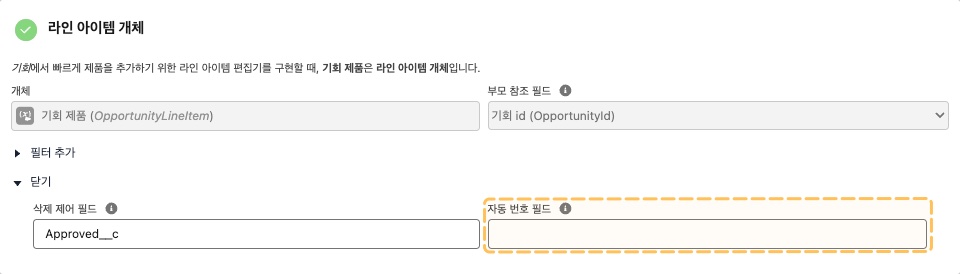
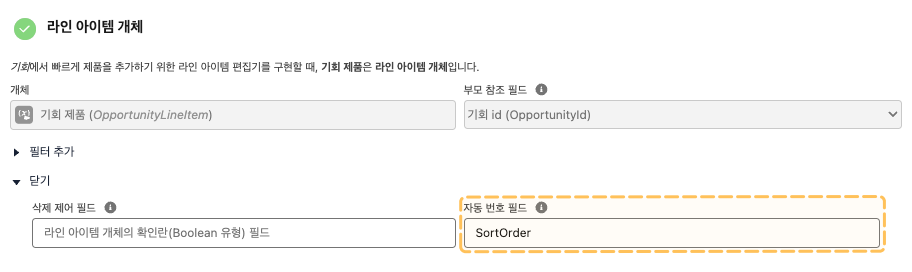
1. 빌더에서 [개체 연결](/ko/smallbuilder-line-items/builder/builder-setup-steps/relate-objects.md) 단계에서 자동 번호 필드에 순서 정렬 필드의 API명(`SortOrder`)를 입력합니다.
2. 정렬 순서를 표시하기 위해 [라인 아이템 편집기 설정](/ko/smallbuilder-line-items/builder/builder-setup-steps/setup-line-item-editor.md) 단계에서 정렬 순서(`SortOrder`)를 추가합니다.
#### 결과
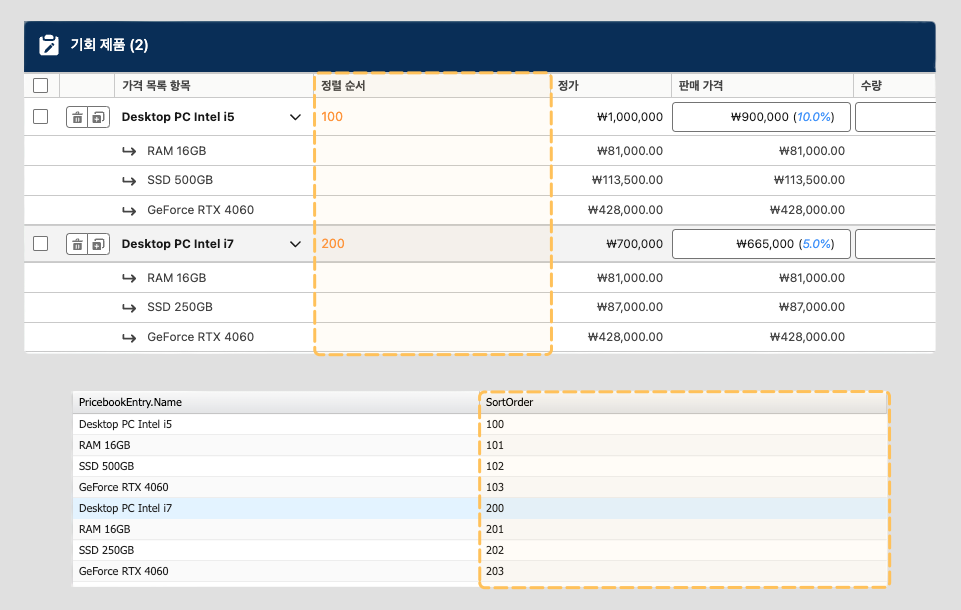
라인 아이템 편집기를 실행하면, 정렬 순서(`SortOrder`) 컬럼에 자동 번호가 할당된 것을 보실 수 있습니다.
{% hint style="info" %}
라인 아이템의 **자동 번호**는 기본적으로 100, 200, 300과 같이 **100 단위**로 순번이 매겨집니다. 구성 제품의 **옵션 라인 아이템**은 주 라인 아이템의 번호를 기준으로 **101, 102와 같이 하위 번호**가 할당됩니다.
{% endhint %}
{% hint style="warning" %}
**옵션 라인 아이템**의 경우, 편집기에서는 **아래 필드 정보만 노출**됩니다:
* 제품명
* 정가
* 단가
* 수량
* 총액
* 할인율/할인액
{% endhint %}