> For the complete documentation index, see [llms.txt](https://help.smallbuilder.com/llms.txt). Markdown versions of documentation pages are available by appending `.md` to page URLs; this page is available as [Markdown](https://help.smallbuilder.com/ko/smallbuilder-line-items/builder/builder-setup-steps/relate-objects.md).
# 개체 연결 (Relate Objects)
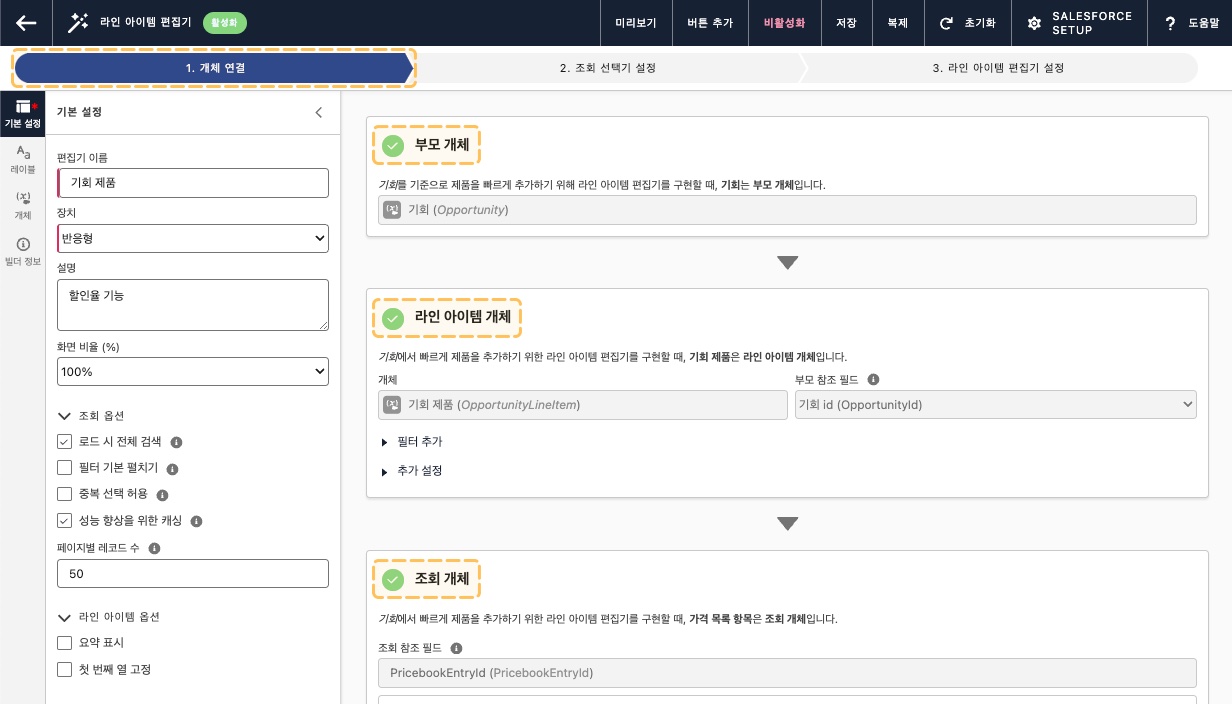
빌더에서 설정해야 하는 가장 첫 번째 단계는 라인 아이템 편집기에서 사용할 개체들의 관계를 정의하는 것입니다. 이 관계는 반드시 [Junction 관계 구조](/ko/smallbuilder-line-items/introduction.md#junction-object)를 따라야 하며, **부모(Parent)**, **라인 아이템(Line Item)**, **조회(Lookup)** 개체를 설정해야 합니다.
### 설정 단계
{% stepper %}
{% step %}
**부모 개체**
부모 개체는 라인 아이템 개체의 **상위 개체**로, **Master-Detail** 또는 **Lookup** 관계를 가집니다. 라인 아이템 편집기는 부모 개체의 레코드 페이지에서 실행됩니다.
[부모 개체 설정하기 >](/ko/smallbuilder-line-items/builder/builder-setup-steps/relate-objects/parent-object.md)
{% endstep %}
{% step %}
**라인 아이템 개체**
**라인 아이템 개체**는 참조 데이터를 선택하여 추가 정보를 입력하고 저장하는 역할을 하는 개체입니다.
[라인 아이템 개체 설정하기 >](/ko/smallbuilder-line-items/builder/builder-setup-steps/relate-objects/line-item-object.md)
{% endstep %}
{% step %}
**조회 개체**
조회 개체는 라인 아이템 개체에서 참조하는 개체로, 사용자는 조회 레코드를 선택하여 이를 기반으로 라인 아이템 레코드를 생성합니다.
[조회 개체 설정하기 >](/ko/smallbuilder-line-items/builder/builder-setup-steps/relate-objects/lookup-object.md)
{% endstep %}
{% endstepper %}
### 예시: 기회 제품 편집 화면 재구성하기
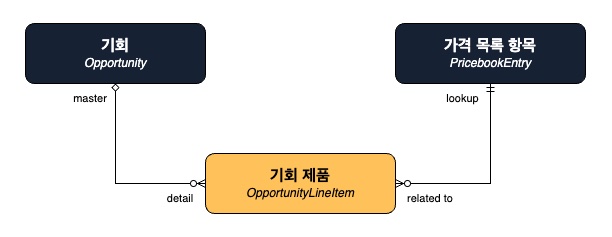
기회(`Opportunity`)를 기준으로 여러 제품을 관리하기 위해 기회 제품(`OpportunityLineItem`)이라는 개체가 사용됩니다. 기회 제품은 가격 목록 항목(`PricebookEntry`)을 참조하여 제품 및 가격 정보를 가져옵니다. 이러한 스탠다드 기회 제품 등록 화면을 SmallBuilder Line Items를 사용하여 재구성하려고 합니다.
* **부모 개체: ****기회**
여러 제품을 연결하는 **상위 개체**로, 기회 제품과 Master-Detail 관계를 가집니다.
* **라인 아이템 개체: ****기회 제품**
판매 가격, 수량, 총 금액 등 **제품 관련 데이터를 저장**하며, 기회와 연결됩니다.
* **조회 개체: ****가격 목록 항목**
제품 이름과 가격 정보를 가져오는 **참조 개체**로, 기회 제품에서 Lookup 관계를 가집니다.
기회 제품은 Junction 개체로, 기회와 가격 목록 항목을 연결하여 특정 기회의 제품 정보를 관리합니다.