> For the complete documentation index, see [llms.txt](https://help.smallbuilder.com/llms.txt). Markdown versions of documentation pages are available by appending `.md` to page URLs; this page is available as [Markdown](https://help.smallbuilder.com/ko/smallbuilder-documents/start-with/undefined-1.md).
# 조직 통화 설정
SmallBuilder를 사용하기 위해 회사의 통화 설정을 확인합니다.
조직이 처음 생성된 후 통화가 null로 설정되어 있을 수 있습니다. 통화가 올바르게 설정되지 않으면 SmallBuilder가 제대로 작동하지 않을 수 있습니다. 제품을 사용하기 전에 조직의 통화가 제대로 설정되어 있는지 확인하세요.
{% hint style="warning" %}
다중 통화가 활성화되어 있는 경우, 해당 과정을 확인하지 않아도 됩니다.
{% endhint %}
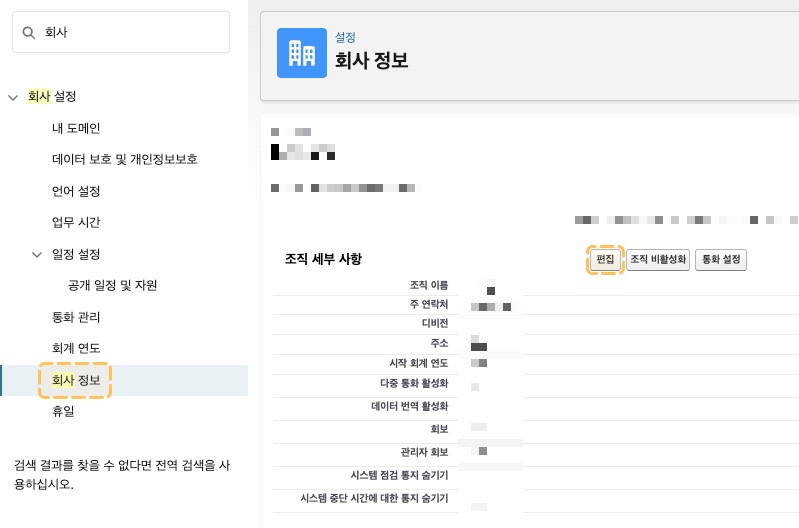
1. 설정에서 빠른 찾기 상자에 **회사**를 입력한 후 **회사 정보**를 선택합니다.
2. **편집**을 클릭합니다.
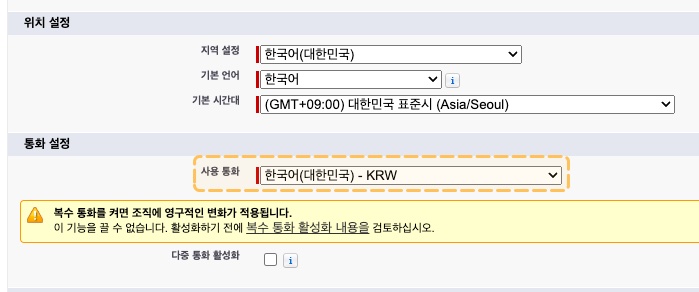
3. **통화 설정**에서 **사용 통화**가 제대로 선택되어 있는지 확인합니다.
null로 되어 있는 경우, 올바른 통화를 선택해 주세요.